
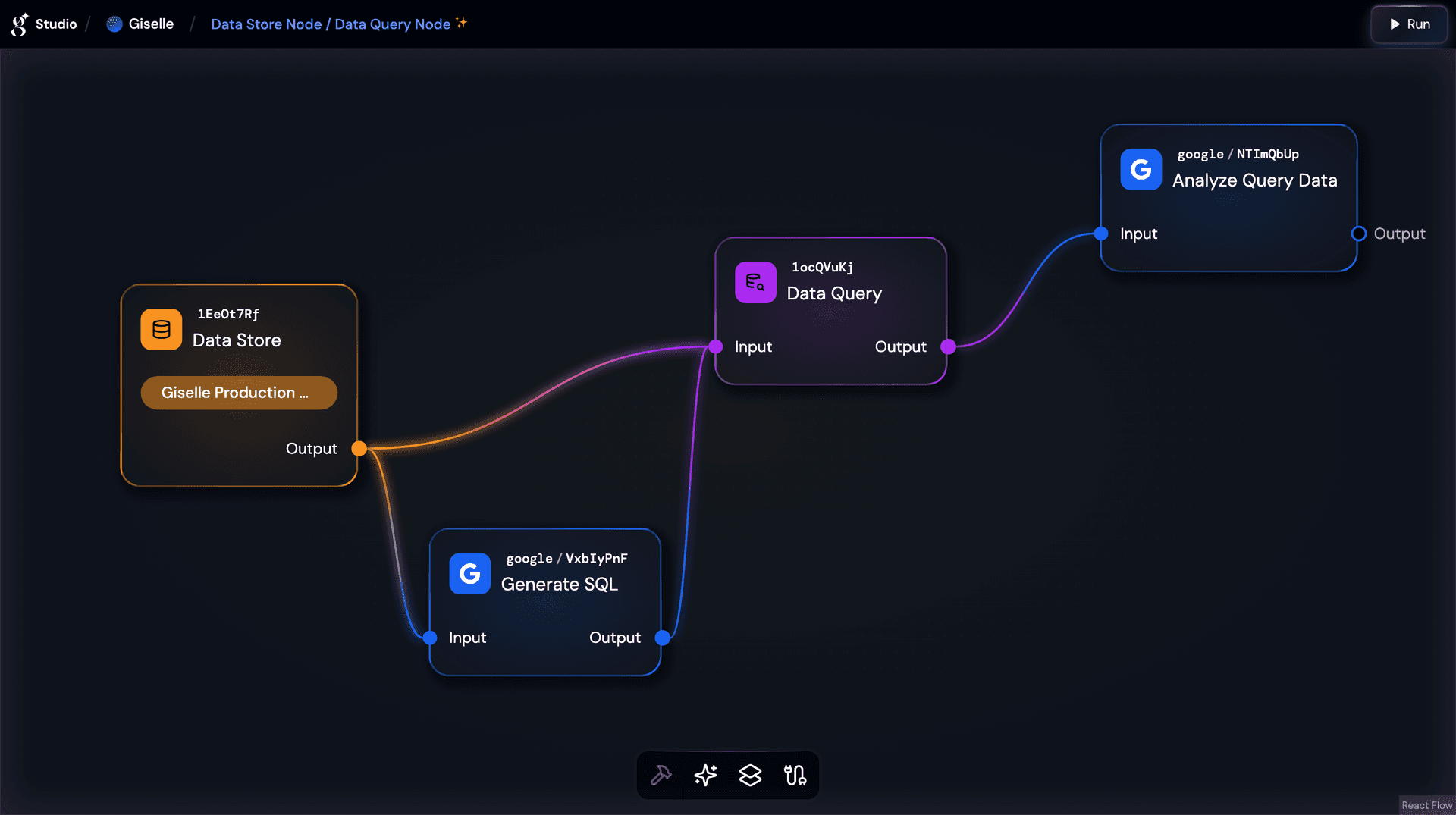
Today, we are thrilled to introduce a powerful new capability on the Giselle platform: the Data Store Node and Data Query Node. This new feature set brings real-world database connectivity to your AI workflows, enabling your agents to query live PostgreSQL databases, analyze structured data, and generate data-driven insights—all within Giselle's no-code, visual interface.
As Giselle continues to evolve as your intuitive AI application builder, we remain committed to empowering you with tools that bridge the gap between AI and your existing data infrastructure. With the Data Store and Data Query Nodes, your AI agents can now go beyond static documents and web content to interact directly with the structured data powering your business.
Node-by-node highlights
| Item | Data Store Node | Data Query Node |
|---|---|---|
| Role | Makes PostgreSQL database connections registered in your team settings available to your workflow. | Executes SQL queries against a connected Data Store Node and returns results in JSON format. |
| Key Process | Lets you select a registered database connection and provides schema information (table names, column names) to downstream nodes. | Receives SQL queries (written directly or dynamically via @ references from other nodes), executes them, and outputs rows, row count, and the executed query. |
| Ideal scenarios | Centralizing database access for your workflows; providing schema context to AI models for intelligent query generation. | Retrieving live data from databases; powering data-driven AI responses and analysis. |
| Giselle Plan | Pro & Team (coming soon) | Pro & Team (coming soon) |
When to use Data Store Nodes and Data Query Nodes?
Choose this powerful combination when you need to build AI agents that can:
- Analyze Business Data: Create an AI assistant that queries your production database to summarize sales figures, user metrics, or operational KPIs on demand.
- Generate Data-Driven Reports: Build workflows that pull fresh data from PostgreSQL and feed it to a Generator Node to produce formatted reports, summaries, or dashboards.
- Answer Questions from Your Database: Let users ask natural language questions that your AI agent translates into SQL, executes, and returns human-readable answers.
Supported databases and verified services
Currently, the following databases are supported:
- PostgreSQL — Connect to any PostgreSQL-compatible database and execute SQL queries directly from your workflows.
Verified hosting services
The following PostgreSQL hosting services have been verified to work seamlessly with Giselle:
- Neon — Fully compatible with SSL connection options. Note that
sslmode=disableis not available. - Supabase — Compatible when using Transaction pooler or Session pooler connection strings. Note that direct connections are not supported, and the
sslmodeparameter is not currently available.
SSL support
You can control the SSL connection mode by specifying the sslmode parameter in your connection string. Options range from disable to verify-full, with verify-full recommended for maximum security.
Plan-based quotas
The number of Data Stores you can register is determined by your team's subscription plan:
| Plan | Data Stores Limit |
|---|---|
| Free | Not available |
| Pro | 10 |
| Team (coming soon) | 20 |
You can monitor your current usage directly on the Data Stores settings page, which displays how many Data Stores you've created and how many more you can create under your plan.
The power of dynamic queries
The Data Query Node is designed as a flexible building block that goes far beyond simple static SQL. Its @ reference system allows you to incorporate outputs from other nodes directly into your queries, unlocking powerful dynamic workflows.
1. AI-Powered SQL Generation
Connect the Data Store Node's output—which includes your database schema—to a Generator Node. The AI model can then understand your table structures and generate precise SQL queries from natural language input. Pipe the generated SQL into the Data Query Node to execute it automatically.
2. Multi-Step Data Pipelines
Chain multiple Data Query Nodes together, using results from one query to inform the next. For example, first identify the top-performing products, then retrieve detailed sales history for those specific items.
3. Context-Enriched Analysis
Combine query results with other data sources—web pages, documents, or vector store results—and feed everything into a Generator Node for comprehensive, multi-source analysis.
By treating the Data Query Node as a composable building block, Giselle empowers you to construct sophisticated data pipelines that rival custom-coded implementations—all through visual, no-code workflows.
What makes these nodes powerful in Giselle?
1. No-Code Database Integration
Simply register your PostgreSQL connection in team settings, then drag and drop a Data Store Node onto your canvas. No backend code, no API wrappers, no infrastructure to manage. Your database is instantly available to your AI workflows.
2. Effortless Natural Language to SQL
Giselle's visual interface makes it effortless to build the most compelling use case: natural language to SQL. Connect a Data Store Node (which exposes your schema) to a Generator Node, let the AI generate SQL, and pipe it into a Data Query Node for execution. What typically requires a full-stack application can be built in minutes with Giselle.
3. Secure Connection Management
Connection strings are encrypted and stored securely—they are never displayed in the UI once saved. SSL connections are supported (availability of specific SSL modes depends on your hosting provider), and all database connections are managed at the team level, giving administrators centralized control over data access.
Get started now
Ready to connect your databases to AI workflows? Follow these steps:
- Log in — Use GitHub, Google, or email to access your Giselle workspace at studio.giselles.ai.
- Register a Data Store — Navigate to Settings > Team > Data Stores and click New Data Store. Enter a name and your PostgreSQL connection string.
- Create or open a workspace — Go to your Workspaces page and create a new workspace or open an existing one.
- Add a Data Store Node — From the toolbar at the bottom of the canvas, click the Context icon and select Data Store to add the node.
- Configure the connection — Select the node, then choose your registered Data Store from the dropdown in the settings panel.
- Add a Data Query Node — Add a Data Query Node from the toolbar and connect the Data Store Node's output to its input.
- Write a query & run — Enter your SQL query in the Data Query Node (or use
@to reference AI-generated SQL from a Generator Node), then click Run Query to see your results.