
Today, we're excited to announce Structured Output — a new capability that lets you define JSON schemas for your AI-generated content directly in the Giselle workspace. With Structured Output, your Generator Nodes and End Nodes can return predictable, typed JSON instead of freeform text, making it dramatically easier to integrate Giselle into your applications and data pipelines.
As AI moves from prototyping to production, one of the biggest challenges is getting reliable, structured data out of language models. Structured Output solves this by letting you define exactly what shape the output should take — property names, types, nesting — all through a visual, no-code interface.
What is Structured Output?
Structured Output allows you to configure your workflow nodes to return JSON data that conforms to a schema you define. Instead of parsing freeform text with regex or heuristics, you get clean, typed objects every time.
This works at two levels:
| Level | Node | What it does |
|---|---|---|
| Generation | Generator Node | Constrains the AI model to output JSON matching your schema |
| Response | End Node | Shapes the final API response by mapping outputs from multiple nodes into a single structured JSON object |
Defining schemas in the workspace
Both Generator Nodes and End Nodes use the same intuitive, form-based schema editor. You define your schema visually — no need to write JSON Schema by hand.
Generator Node: Output Format
In the Generator Node's Advanced options, set the Output Format to JSON to unlock structured output. Click Set Schema to open the schema definition dialog.
The schema editor supports:
- Primitive types:
STR,NUM,BOOL - Complex types:
OBJ(nested objects),ARR(arrays),ENUM(constrained value sets) - AI-assisted generation: Describe your desired output in plain language and let AI generate the schema for you
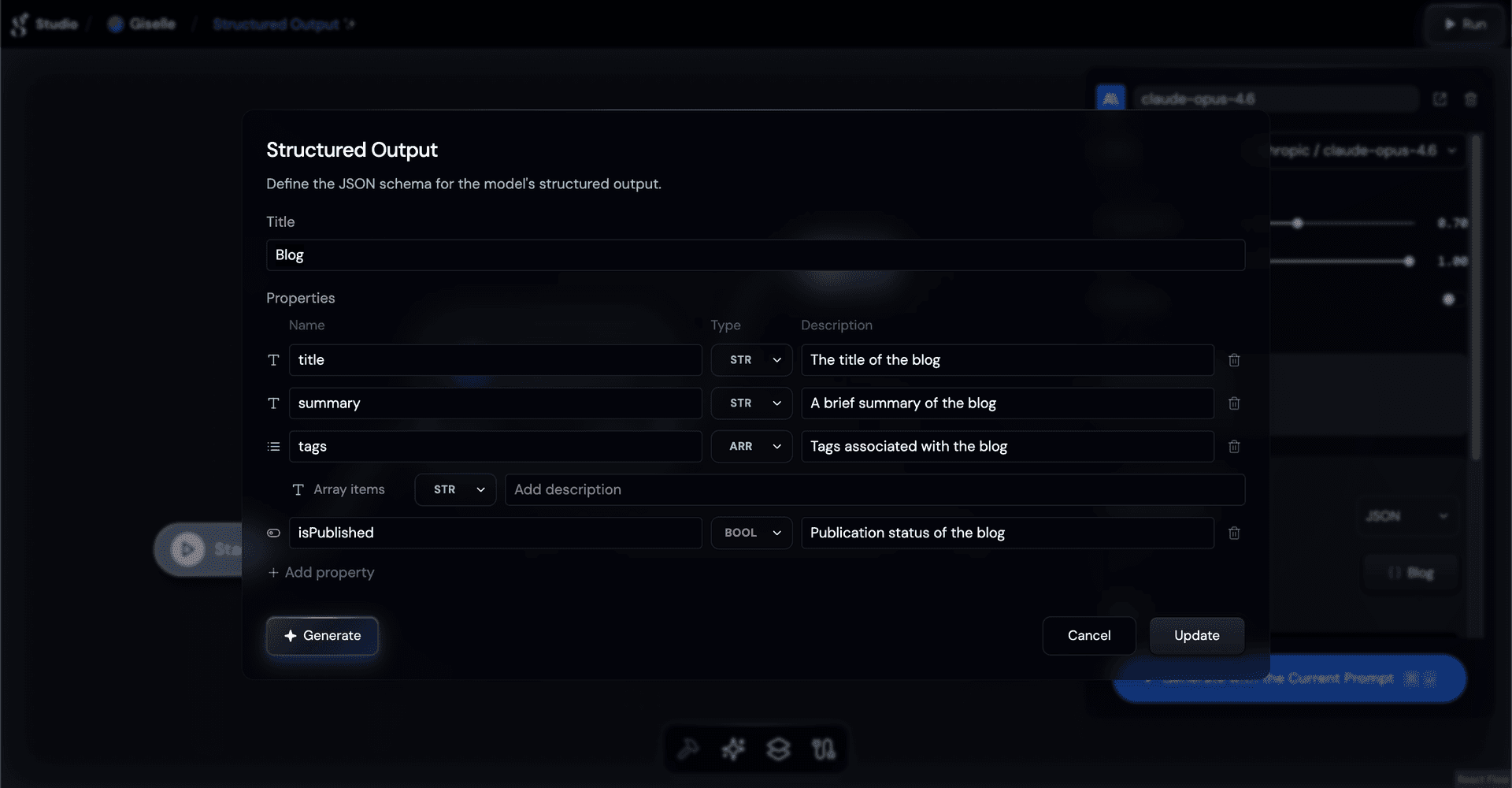
For example, to have a Generator Node return blog post metadata, you might define:
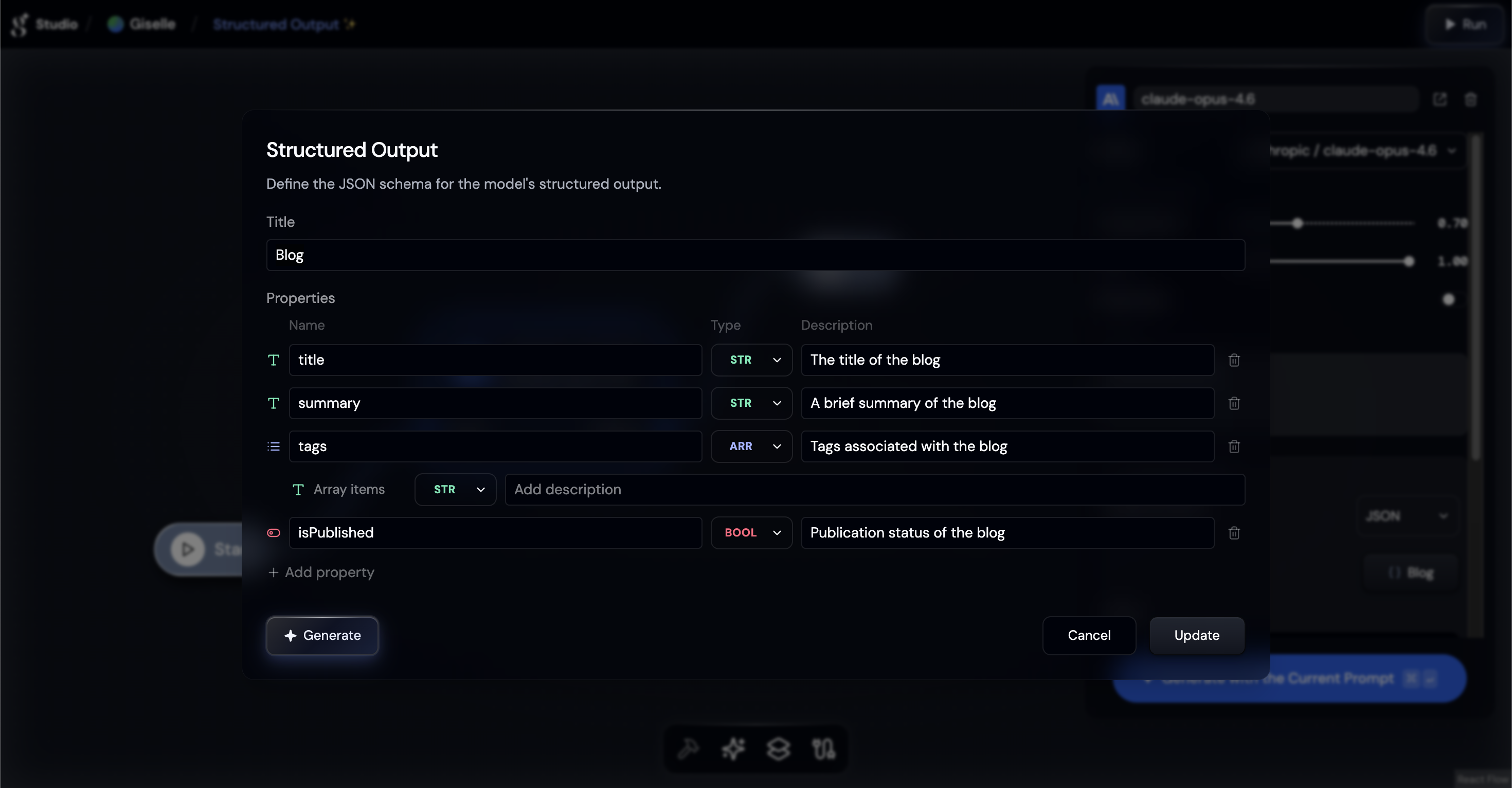
The AI model will then be constrained to produce output matching this exact structure — no more hoping the model follows your prompt instructions.
End Node: JSON response shaping
The End Node's Output Format can also be set to JSON, but it serves a different purpose: it lets you combine and reshape outputs from multiple upstream nodes into a single, clean API response.
For example, you can have multiple Generator Nodes — each responsible for a different part of the output — all feeding into a single End Node:
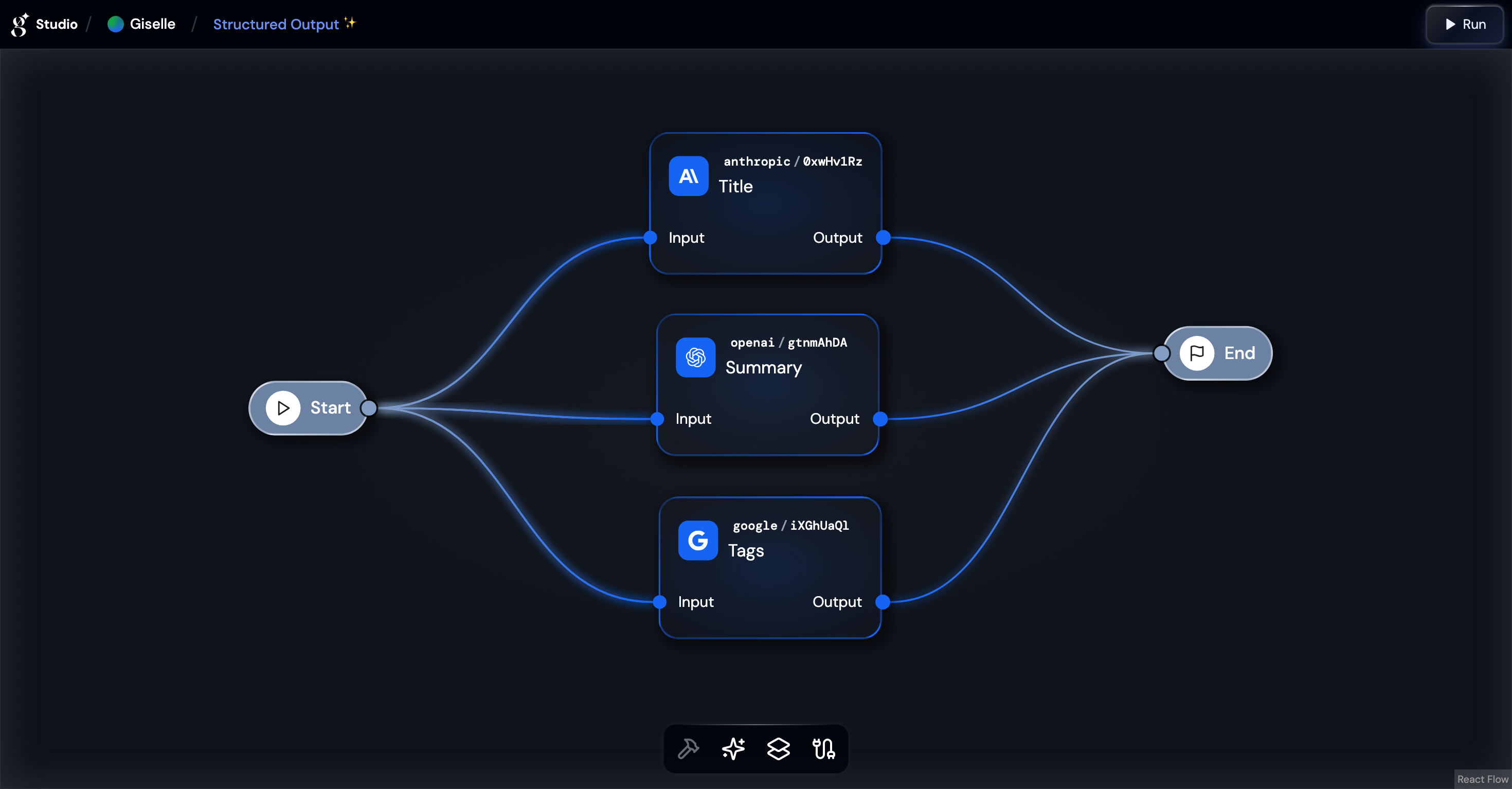
Each property in the End Node schema requires a Value — the source node whose output populates that field:
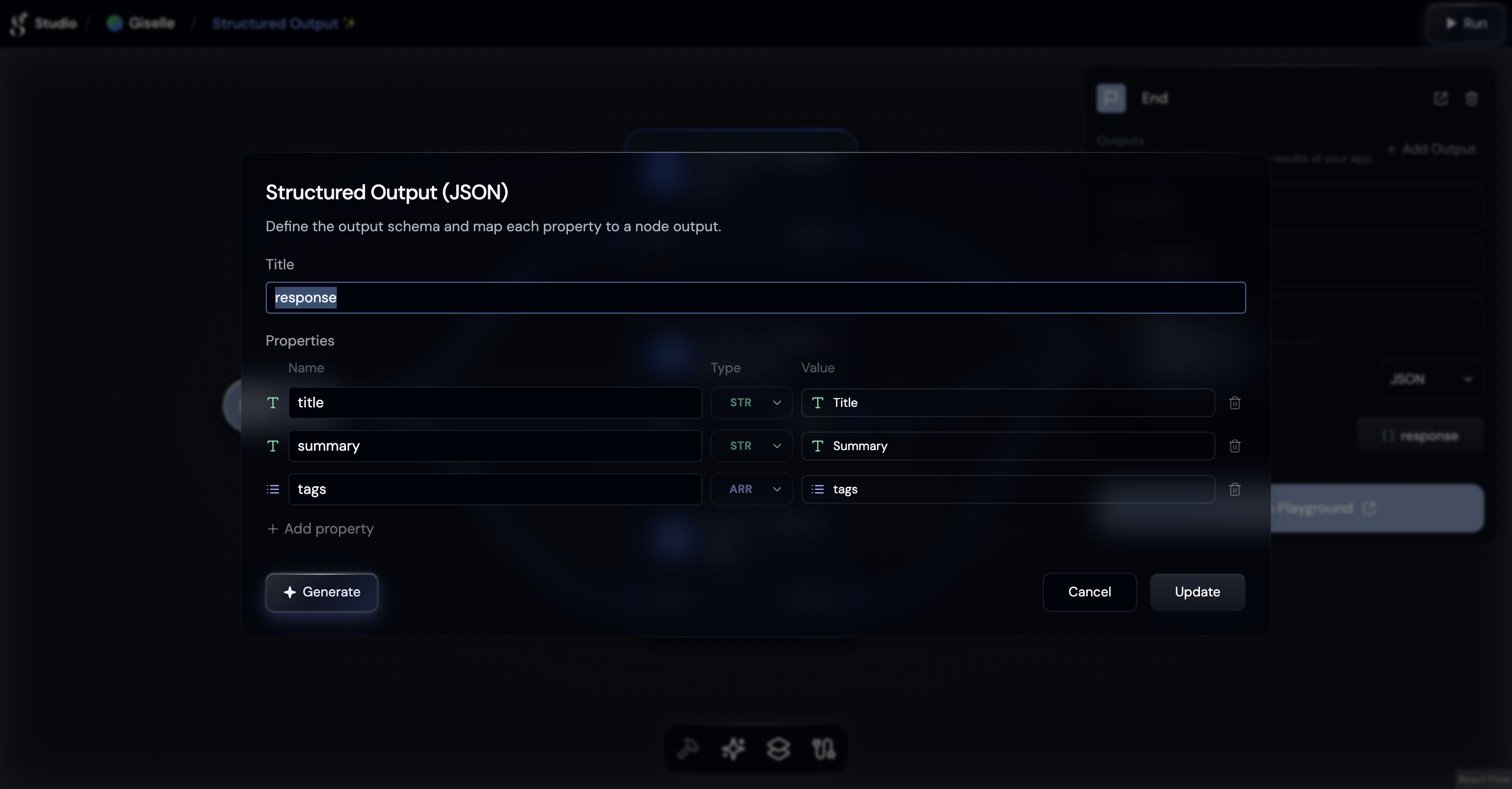
This means you can assign property names to raw node outputs, cherry-pick fields from nodes that themselves use structured output, and merge results from different branches of your workflow into one response object.
This is especially powerful when building API endpoints where you need a consistent response contract regardless of the internal workflow complexity.
See it in action: workspace demo
Here's a quick walkthrough of setting up Structured Output in the workspace and seeing the results:
Type-safe integration with the Giselle SDK
When Structured Output is enabled on your End Node, the Run > Code tab in the workspace automatically generates a ready-to-use code snippet — complete with the schema definition and a preview of the expected response JSON structure. Just copy and paste into your application.
The generated code uses the Giselle SDK with full type safety. Pass any Standard Schema v1 compatible schema — such as Zod, Valibot, or ArkType — to the schema parameter, and the SDK will automatically validate the response and infer TypeScript types:
import Giselle from "@giselles-ai/sdk";
import { z } from "zod";

const client = new Giselle({
  apiKey: process.env.GISELLE_API_KEY,
});

const schema = z.object({
  title: z.string(),
  summary: z.string(),
  tags: z.array(z.string()),
  published: z.boolean(),
});

const { task } = await client.apps.runAndWait({
  appId: "app_xxxxx",
  input: { text: "Write a blog post about AI workflows" },
  schema,
});

if (task.status === "completed" && task.outputType === "object") {
  // task.output is fully typed as { title: string; summary: string; tags: string[]; published: boolean }
  console.log(task.output.title);
  console.log(task.output.tags);
}
See it in action: SDK demo
The SDK validates the response against your schema at runtime. If validation fails, a SchemaValidationError is thrown with detailed error messages — no silent data corruption.
Verified validation libraries
| Library | Minimum Version |
|---|---|
| Zod | 3.24+ |
| Valibot | 1.0+ |
| ArkType | 2.0+ |
| Yup | 1.7+ |
| Effect Schema | 3.13+ |
What makes Structured Output powerful in Giselle?
1. No-code schema design
Define complex nested schemas through a visual form — objects within objects, arrays of typed elements, enums with constrained values. No JSON Schema syntax to memorize.
2. AI-assisted schema generation
Not sure how to structure your output? Describe what you want in plain language, click Generate, and the AI will create an appropriate schema for you.
3. End-to-end type safety
From the visual schema editor in the workspace to the StandardSchemaV1 parameter in the SDK, your data types are enforced at every layer — design time, AI generation time, and application runtime.
4. Composable response shaping
The End Node's Value mapping lets you assemble responses from multiple nodes, giving you full control over your API contract without writing any transformation code.
Get started now
Ready to get structured, typed JSON from your AI workflows? Here's how:
- Open your workspace — Go to studio.giselles.ai and open a workspace.
- Set Output Format on a Generator Node — Select a Generator Node, open Advanced options, and set Output Format to JSON. Click Set Schema to define your structure.
- Configure the End Node — Select the End Node, set Output Format to JSON, define your response schema, and map each property to an upstream node's output.
- Test in Playground — Run your app in the Playground to verify the structured response.
- Integrate with the SDK — Copy the code snippet from the Run > Code tab and add a
schemaparameter with your preferred validation library for full type safety.