
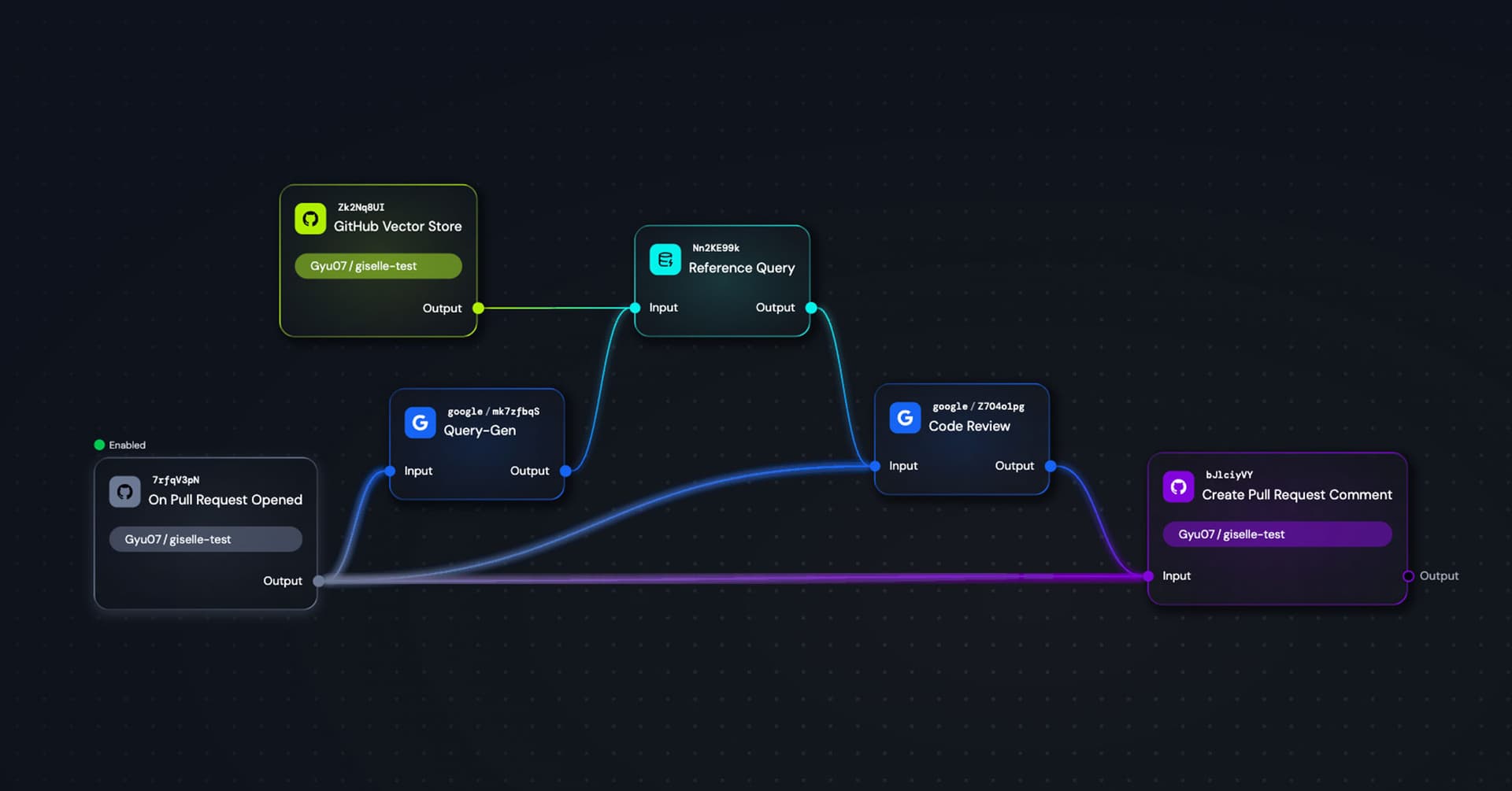
In my previous article, I introduced GitHub event-driven workflows—how to build automated assistants that respond to issues in real-time. Today, we're taking that foundation and building something more sophisticated: a pull request review agent.
Why Build a Custom PR Review Agent?
PR review agents are everywhere now. CodeRabbit, Qodo, GitHub Copilot—they've become essential tools for modern development teams. In fact, we use one in Giselle's own open-source repository.
But here's the thing: every team is different. Your codebase has its own conventions. Your team has specific concerns they care about. As AI-assisted development becomes more common, review workloads are increasing, and the kinds of feedback teams need vary widely based on their skills, scale, and the systems they're building.
What if you could build a review agent tailored to your exact needs? One that understands your existing codebase and reviews PRs with that context in mind?
That's what we're building today. And the best part—no code required.
Tutorial: Building a PR Review Agent
We'll create a workflow that:
- Triggers when a pull request is opened
- Analyzes the PR's title, body, and code diff
- References your existing codebase via Vector Store (Agentic RAG)
- Posts a detailed code review as a comment
Let's dive in.
Step 1: Setting Up the GitHub Trigger Node
First, add a GitHub Trigger node and configure it for "Pull Request Opened" events.

Select your repository and set the event type to "Pull Request Opened". This trigger gives us access to three crucial pieces of information:
- Pull Request Title — What the PR is about
- Pull Request Body — The description and context
- Pull Request Diff — The actual code changes
These become the foundation for our review.
Step 2: Building an Agentic RAG Pipeline
Here's where it gets interesting. We don't just want to review the diff in isolation—we want the AI to understand how the changes relate to the existing codebase.
To do this, we'll use the approach I covered in my Vector Store article: an Agentic RAG pattern where the AI generates its own queries.
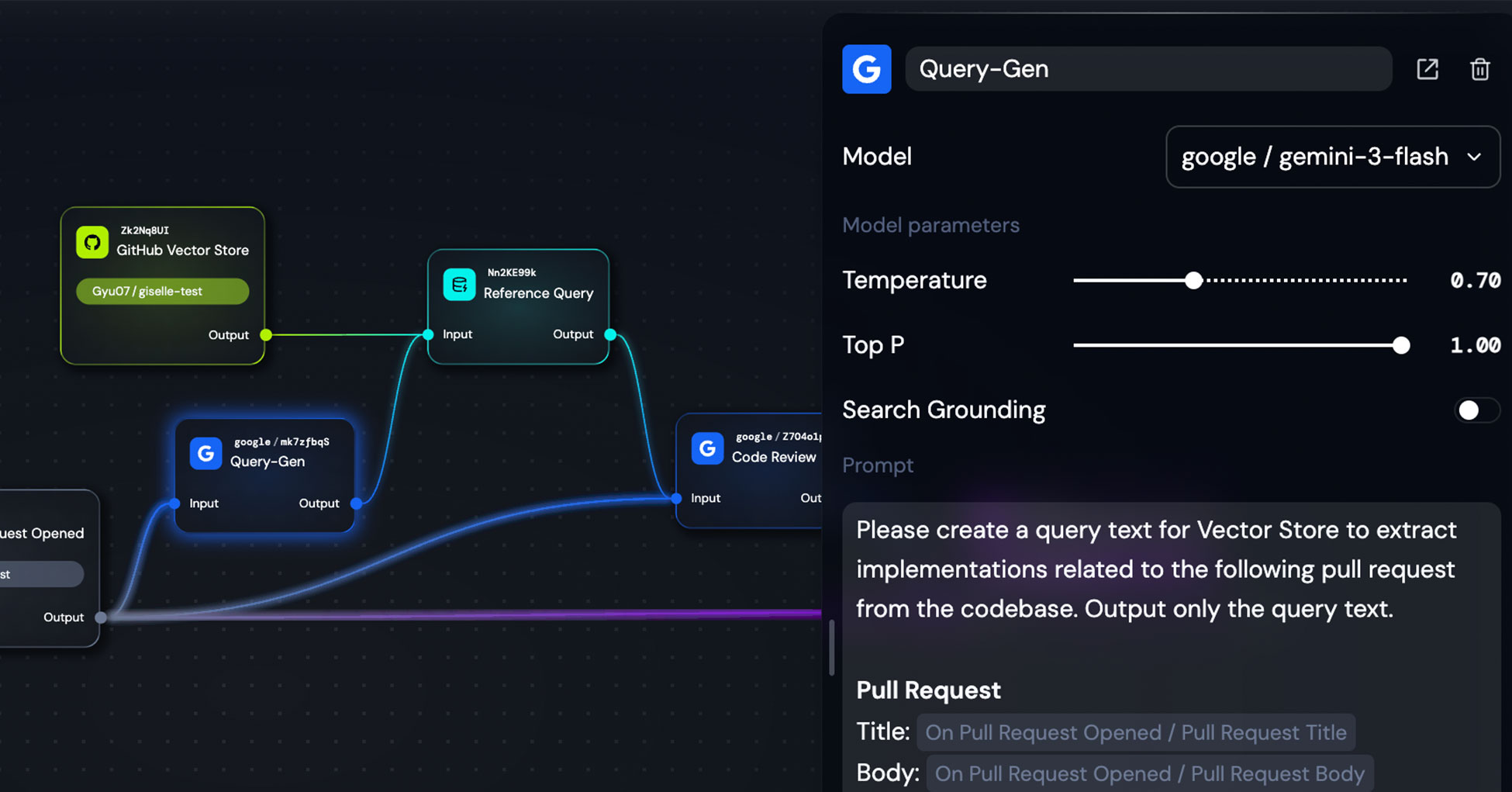
Add a Generator node (I'm using google/gemini-3-flash) with this configuration:
Prompt:
Please create a query text for Vector Store to extract implementations related to the following pull request from the codebase. Output only the query text.

Pull Request
Title: {{On Pull Request Opened / Pull Request Title}}
Body: {{On Pull Request Opened / Pull Request Body}}
This node looks at the PR and generates a semantic search query to find relevant code in your repository. Connect its output to a Reference Query node linked to your GitHub Vector Store.
The result? Your workflow now retrieves existing code that's contextually related to the incoming changes.
Step 3: The Code Review Generator
Now we bring it all together. Add another Generator node for the actual code review.
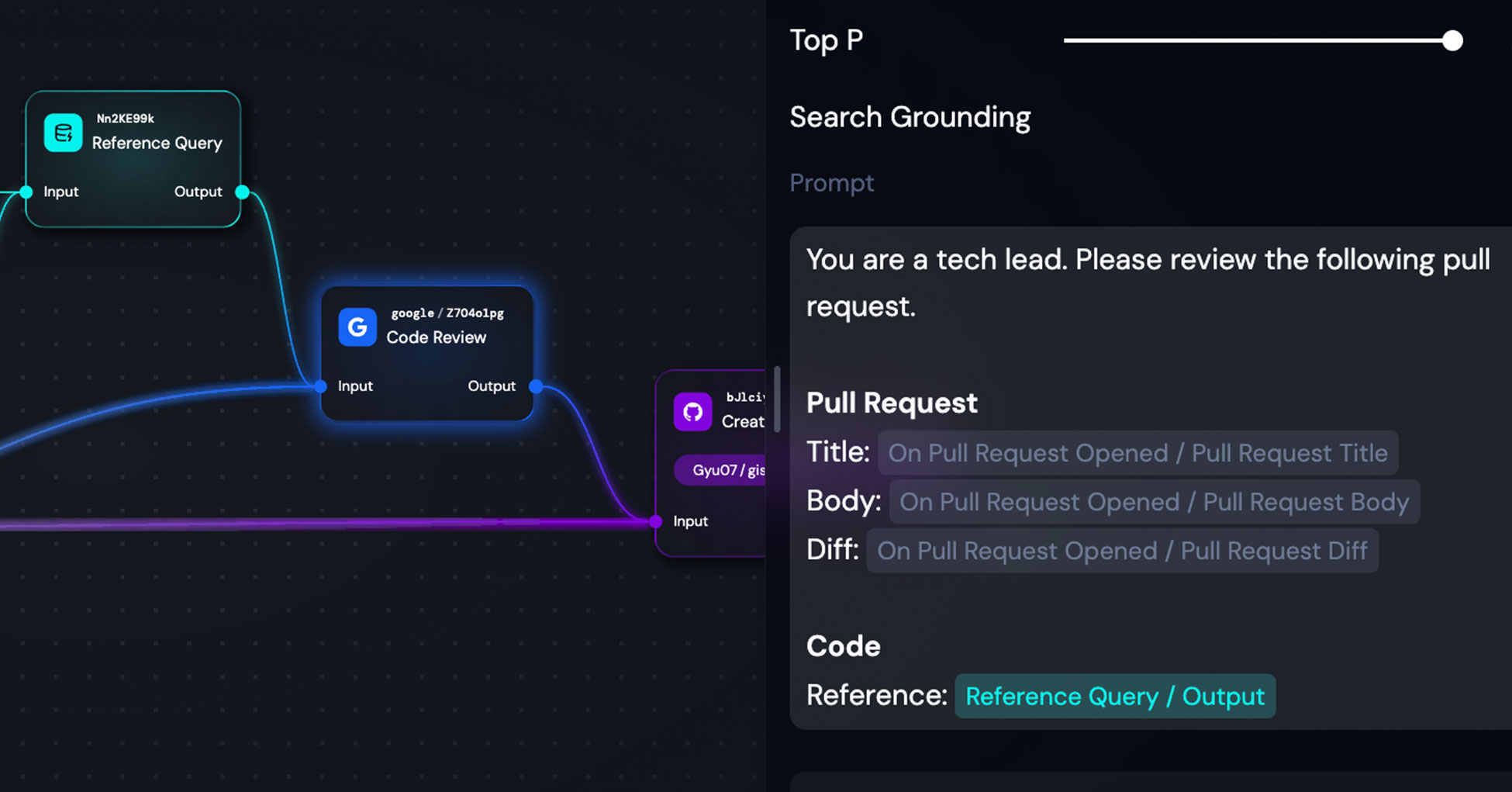
Here's my configuration:
Prompt:
You are a tech lead. Please review the following pull request.

Pull Request
Title: {{On Pull Request Opened / Pull Request Title}}
Body: {{On Pull Request Opened / Pull Request Body}}
Diff: {{On Pull Request Opened / Pull Request Diff}}

Code
Reference: {{Reference Query / Output}}
I've kept the prompt intentionally simple. The power comes from the inputs:
- The PR metadata (title, body, diff) from the Trigger node
- The relevant codebase context from the Vector Store query
The model receives everything it needs to provide an informed review.
Step 4: Posting the Review to GitHub
Finally, add an Action node to post the review back to the pull request.
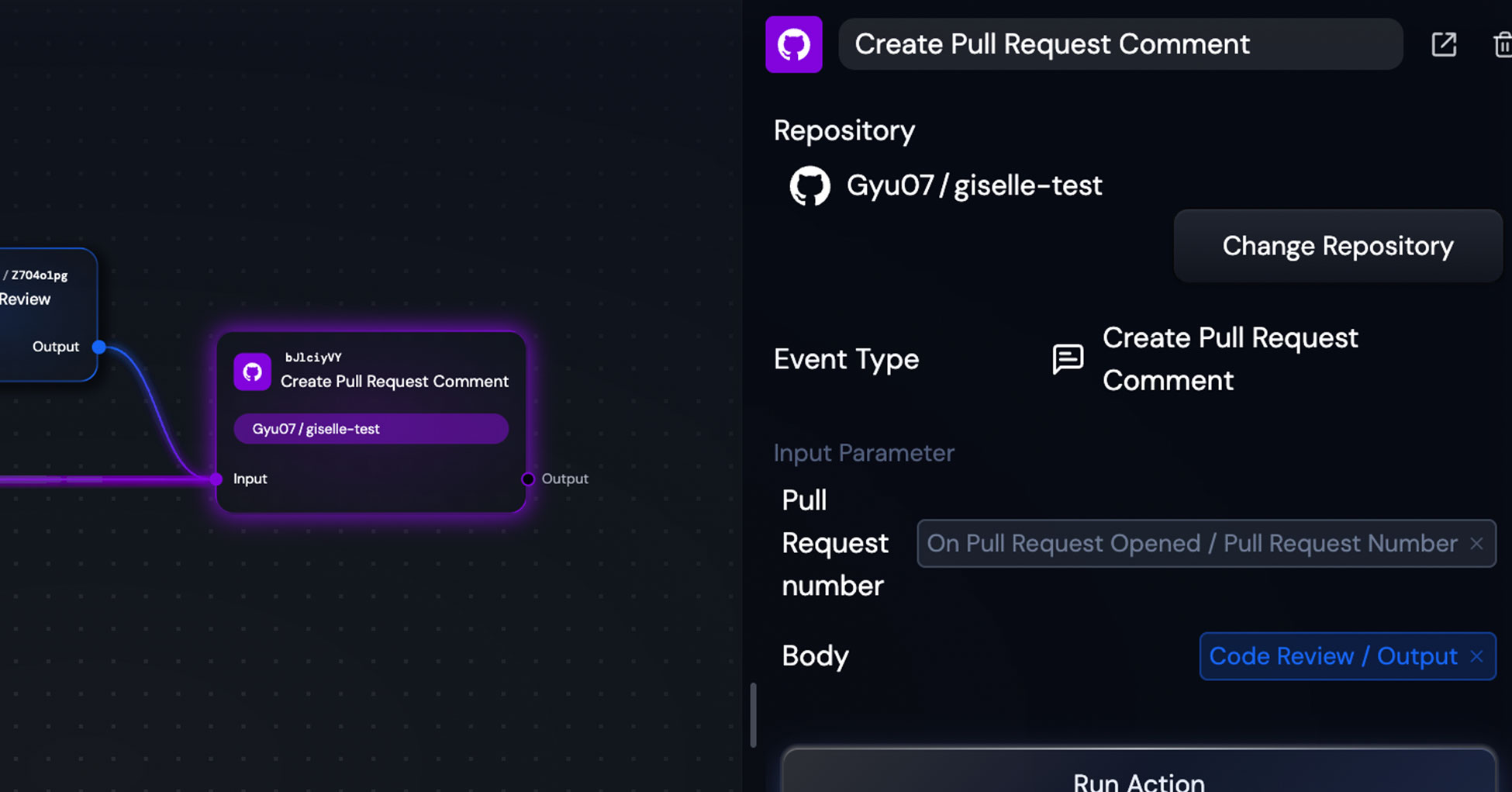
Configure it as follows:
- Event Type: Create Pull Request Comment
- Repository: Your target repository
- Pull Request number:
{{On Pull Request Opened / Pull Request Number}} - Body:
{{Code Review / Output}}
The key here is connecting the PR number from the Trigger node—this ensures the comment lands on the correct pull request.
Don't forget to enable the trigger! Click the Enable button on your Trigger node to activate the workflow.
Seeing It in Action
With everything configured, let's see what happens when a real PR is opened.
I created a test PR for a TypeScript snake game implementation—intentionally leaving some gaps to see how the reviewer would respond.
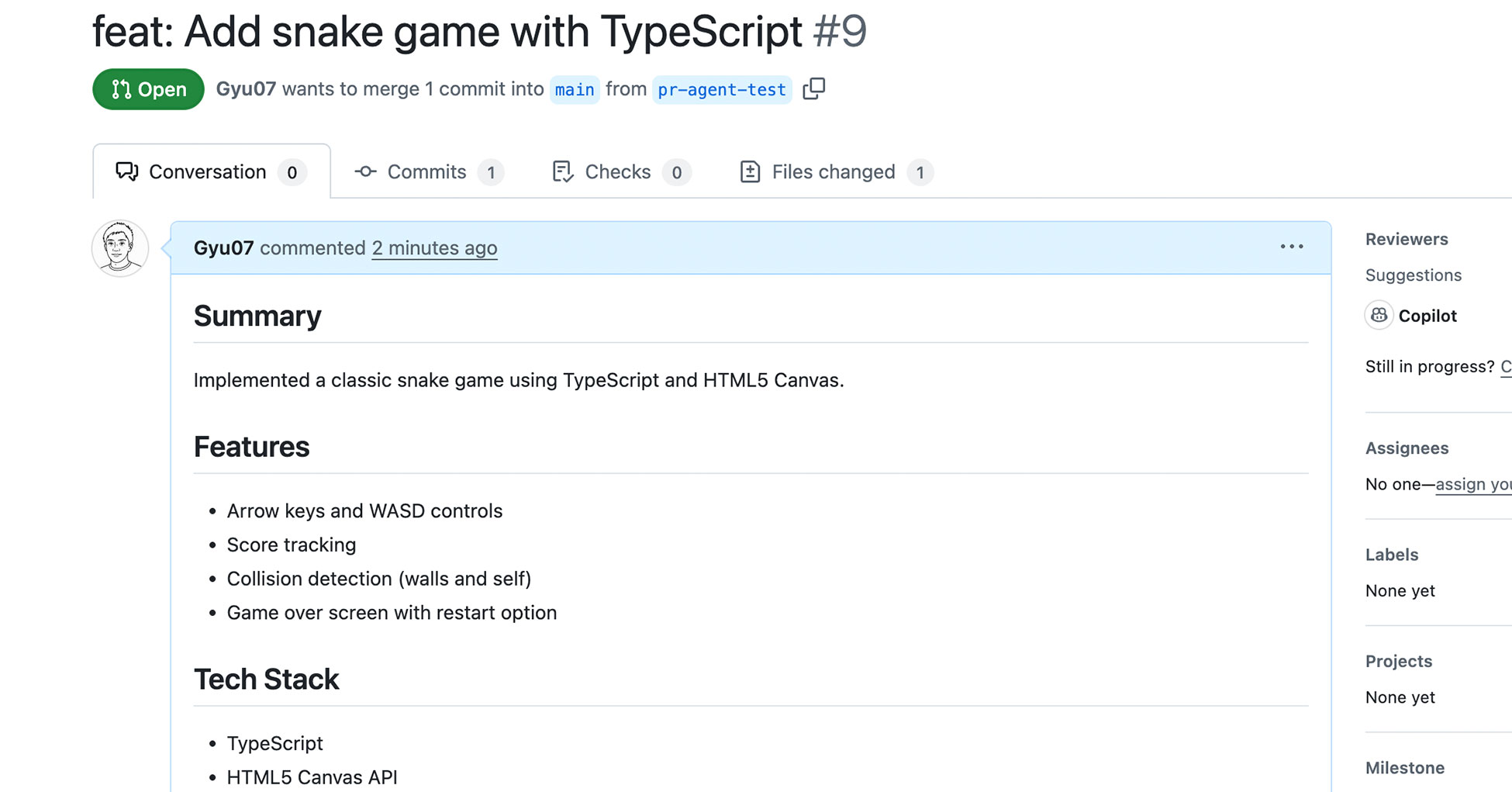
The PR includes features like arrow key controls, score tracking, and collision detection. Within a minute of opening the PR, the Giselle bot posted its review:
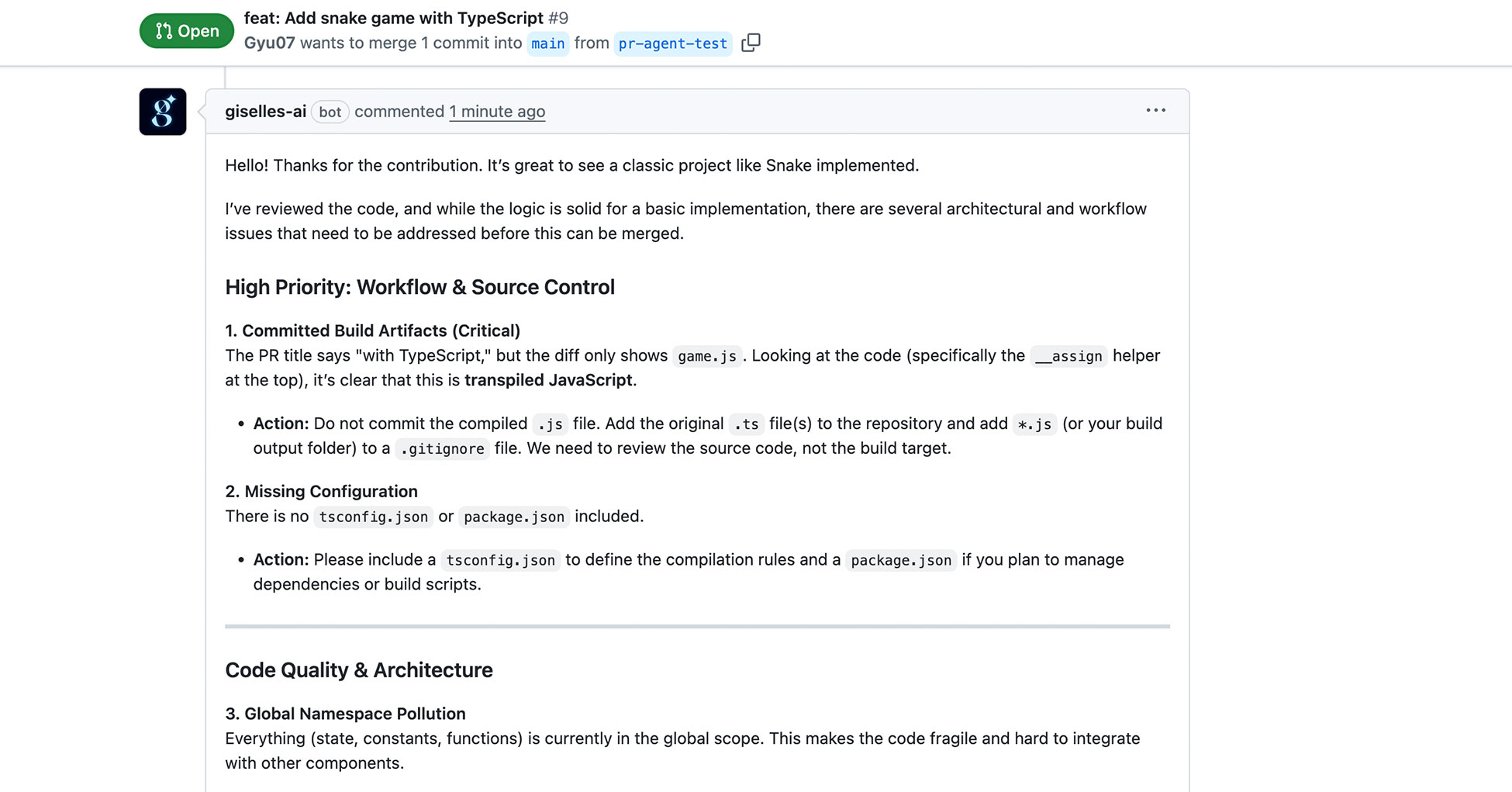
The review identified several issues I'd deliberately left in:
High Priority: Workflow & Source Control
- Detected that the diff showed transpiled JavaScript (
game.js) instead of TypeScript source files - Recommended adding
.tsfiles and updating.gitignore - Noted missing
tsconfig.jsonandpackage.json
Code Quality & Architecture
- Identified global namespace pollution
- Suggested encapsulating the code in a class or module
This is exactly the kind of contextual, actionable feedback that makes AI review agents valuable.
Going Further
What we built is a foundation. Here are ways to extend it:
Customize the review focus: Adjust the prompt to emphasize what matters to your team—security, performance, coding standards, or specific architectural patterns.
Add historical context: Vector Store can index more than just code. Include past pull requests, issue discussions, and design documents. Your agent can then reference previous decisions and conversations when reviewing new changes.
Use different models: The latest models from various providers deliver surprisingly sophisticated analysis. Experiment to find what works best for your codebase.
Combine with labels: Use the Label trigger to run different review workflows based on PR type. A security label could trigger a security-focused review, while documentation triggers a different analysis.
Wrapping Up
Every team has unique needs when it comes to code review. While existing tools like CodeRabbit, Qodo, and Copilot provide excellent general-purpose reviews, there's real value in building agents tailored to your specific context.
I use this review agent regularly on my own projects. The accuracy improves significantly with the latest models, and the ability to ground reviews in your actual codebase makes the feedback genuinely useful.
The workflow we built today took about 20 minutes to set up. It combines event-driven triggers, Agentic RAG for codebase awareness, and automated GitHub actions—all without writing code.
Give it a try on your own repositories. I'd love to hear what kinds of review agents you build.