
In my previous article, I covered the basics of Vector Store and Vector Query in Giselle. Today, I want to show you a more advanced use case that showcases the real power of this feature: cross-repository analysis.
If you've ever wanted AI to compare how different projects implement the same concept, or to understand the technical differences between competing open-source tools, this article is for you.
The Challenge of Cross-Repository Analysis
Tools like Cursor and Claude Code are excellent at analyzing a single repository. They can navigate codebases, understand architecture, and answer technical questions with impressive accuracy.
But what happens when you need to analyze multiple repositories at once?
Let's say you want to compare how two different projects implement vector storage. With traditional AI coding assistants, you'd need to:
- Fork both repositories locally
- Carefully organize your directory structure so the AI can access both
- Manually provide context about which files belong to which project
- Hope the AI doesn't get confused between the two codebases
It's doable, but it requires significant setup and mental overhead.
How Giselle Solves This Problem
With Giselle, there's no need to manage local directories or complex folder structures. You simply:
- Connect multiple repositories to separate Vector Stores
- Use a single Vector Query node to pull relevant context from both
- Let your LLM synthesize the information
The AI can seamlessly access and compare code from entirely different projects.
Tutorial: Building a Cross-Repository Technical Comparison App
Let's build something practical. We'll create an app that can answer technical questions about how Giselle and n8n implement vector storage—two different projects with different architectures.
Step 1: Set Up Your Vector Stores
Create two GitHub Vector Stores:
- Giselle: GitHub Vector Store → Connect to
giselles-ai/giselle - n8n: GitHub Vector Store → Connect to
Gyu07/n8n(your forked n8n repository)
Select appropriate embedding models for each. For code-heavy repositories, I recommend using models optimized for technical content.
Step 2: Design Your Workflow
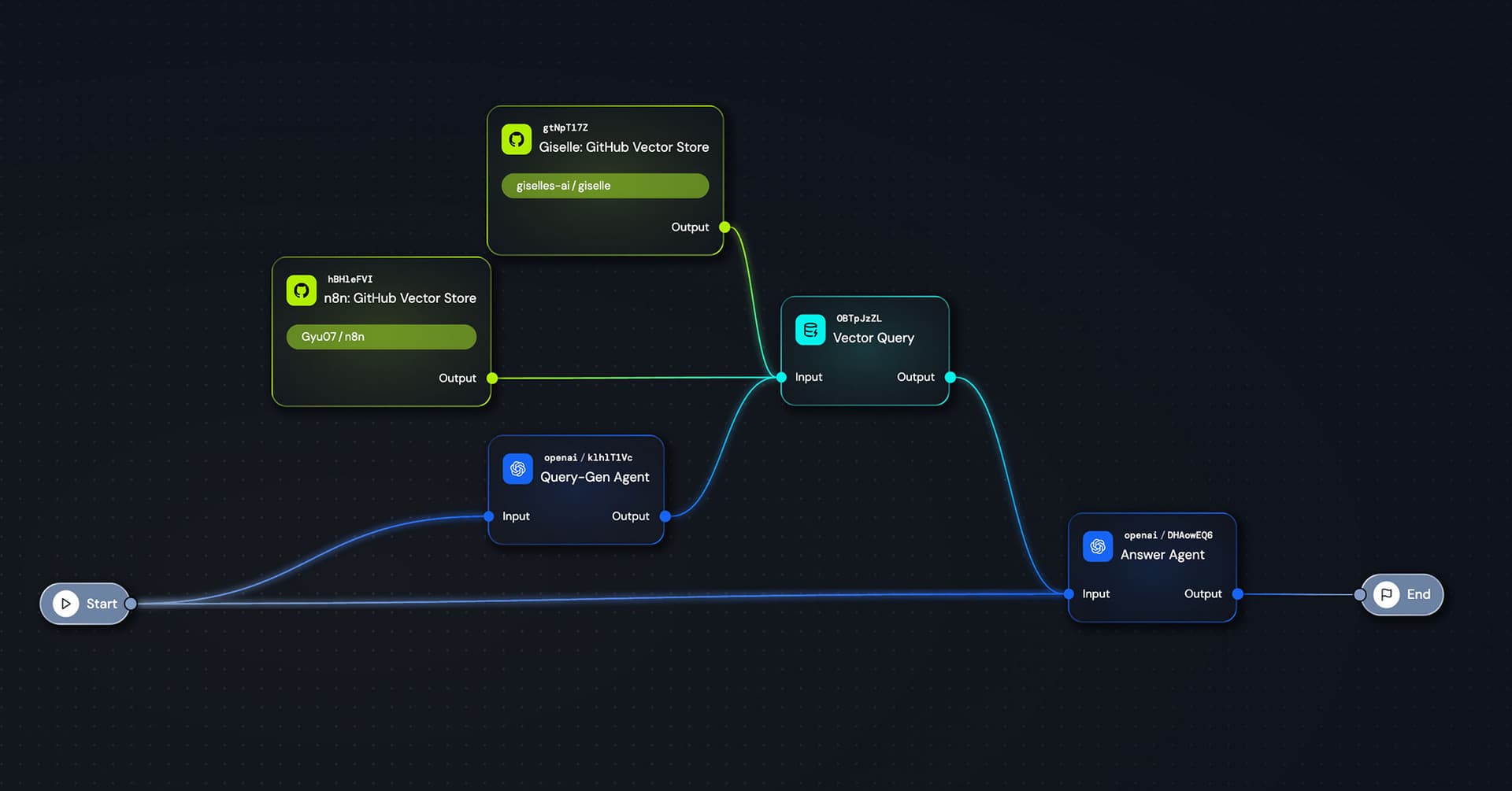
Here's the workflow structure I built:
- Start Node: Captures the user's technical question
- Query-Gen Agent: An LLM that transforms the user's question into an optimized search query
- Vector Query: A single node that receives input from both Vector Stores simultaneously
- Answer Agent: An LLM that synthesizes the retrieved information and provides a comparative analysis
- End Node: Outputs the final response
Notice how both Vector Stores connect to a single Vector Query node. Giselle handles the multi-source retrieval automatically.
You can run workflows in the workspace without connecting Start and End nodes. However, connecting them unlocks Stage—a chat-like UI in Giselle's playground where you can freely interact with your workflow.
Step 3: Configure Your Answer Agent
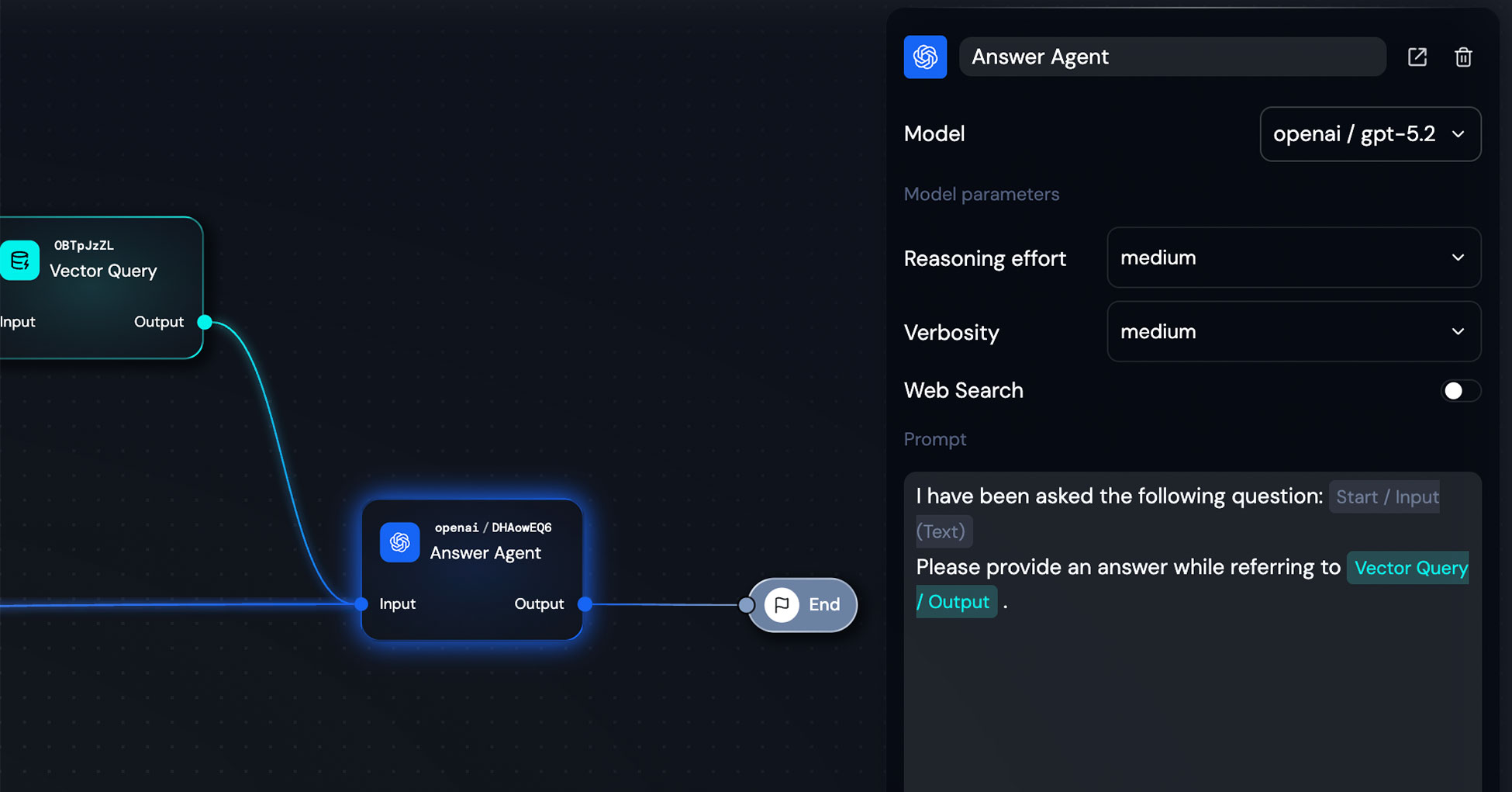
For the Answer Agent, I used OpenAI's gpt-5.2 with a simple prompt structure:
I have been asked the following question: {{Start / Input (Text)}}

Please provide an answer while referring to {{Vector Query / Output}}.
That's it. The prompt is intentionally minimal—the Vector Query output already contains well-structured context from both repositories, so the LLM just needs to synthesize and compare.
Model parameters:
- Reasoning effort: medium
- Verbosity: medium
- Web Search: off (we're relying on our Vector Stores)
Step 4: Test It Out
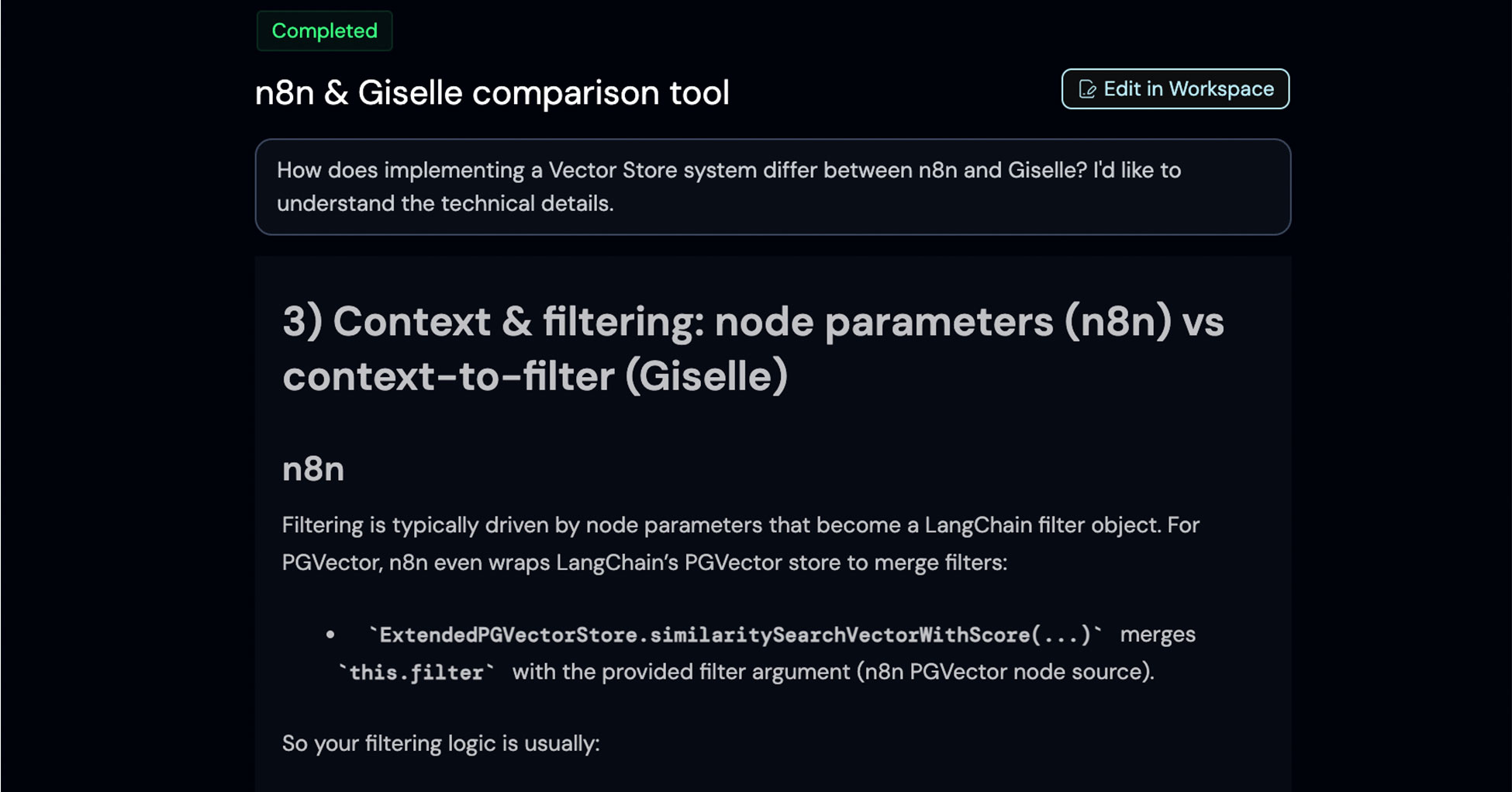
Here's what happens when I ask: "How does implementing a Vector Store system differ between n8n and Giselle? I'd like to understand the technical details."
The app returns a detailed technical comparison. In this example, it analyzed how each project handles context and filtering:
n8n's approach:
- Filtering driven by node parameters → LangChain filter object
- Uses
ExtendedPGVectorStore.similaritySearchVectorWithScore() - Flow: UI parameters → filter object → LangChain store method call
Giselle's approach:
- Strongly structured and validated filtering
- Uses
createPostgresQueryServicewith typedcontextToFilterfunction - Metadata validated with Zod schema
- Filtering decisions pushed into service layer rather than UI parameter mapping
This level of technical detail—pulled directly from both codebases and compared side-by-side—would be extremely difficult to get from a standard AI chat interface.
Why This Matters for Private Repositories
Here's something important that often gets overlooked.
When you ask ChatGPT or Claude about technical implementations, they can search the web or draw from their training data. But this only works for publicly documented information. If the knowledge isn't in blog posts, documentation, or Stack Overflow discussions, the AI simply won't know about it.
More critically, for private repositories, traditional chat-based AI tools present a real concern: your code and data could potentially be used to train future models. This is why many enterprises restrict the use of consumer AI tools for sensitive codebases.
With Giselle's Vector Store approach via API:
- Your code stays in your control
- Data isn't used for model training
- You can safely analyze private repositories across your organization
- Teams can compare internal projects without exposing proprietary code
This makes cross-repository analysis not just possible, but safe for enterprise use cases.
How Long Does It Actually Take?
I'll be honest with you: I built this entire app in about 15 minutes.
Including prompt tuning and testing to get the results I wanted? Maybe 30 minutes total.
Now, I've been using Giselle extensively, so I'm familiar with the interface and best practices. If you're just starting out, your first app might take longer. That's completely normal.
But here's the point: once you're comfortable with the workflow, you can spin up sophisticated AI applications incredibly fast. And because Giselle is designed for team collaboration, you can immediately share your apps with colleagues.
No deployment pipelines. No infrastructure management. Just build, test, and share.
Wrapping Up
Cross-repository analysis is just one example of what becomes possible when you combine multiple Vector Stores with Giselle's visual workflow builder.
Whether you're:
- Comparing open-source alternatives before making a technology decision
- Auditing how different teams in your organization solve similar problems
- Building internal tools that need context from multiple codebases
...the pattern is the same: connect your repositories, design your workflow, and let AI do the heavy lifting.
If you haven't tried Vector Store yet, start with a single repository. Once you're comfortable, experiment with multi-repository setups. The possibilities expand quickly from there.
Give it a shot.